This post uses Amazon affiliate links. As an Amazon Associate, I earn from qualifying purchases.
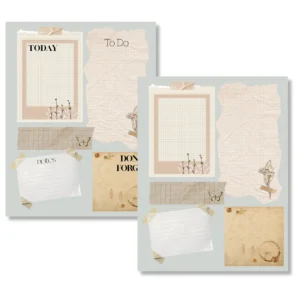
This set of two ephemera daily planner templates comes as a 2-page PDF, size 8.5″ x 11″. Once you have the file saved to your device, you can print a new one whenever you need!
How to use the ephemera daily planner pages
- Click the download button below.
- Save the Google Drive file to your Google Drive or device. I recommend creating a folder for all current and future Cohines Crossing freebies.
- Print a new copy whenever you need!
What printer do I use?
I often get asked what kind of printer I use, as I print SO MUCH! I have an Epson Ecotank and I LOVE it because the ink seems to last FOREVER!
Different ways to use the ephemera daily planner template pages
- As a planner, insert to an existing planner.
- As a desk planner.
- As a daily journal insert.
- For creative goal setting and planning.
- As a background in a junk journal.
Tips and notes for printing
- Keep in mind that quality and color can vary from monitor to monitor and from the monitor to your printer.
- Try printing at 100% or full size depending on your printer settings.
- Use a three-hole punch and add a new planner insert each day to build an aesthetic monthly planner.
Other planner templates and freebies
Be sure to bookmark cohinesdesign.com so you can come back and check for new daily planner template printables and other free printables.